HubSpot Sales Hub review
Bottom line
HubSpot Sales Hub is the CRM to pick when you expect to add marketing and support later and want one database behind all of them. The free tier and $15 Starter plan are generous and quick to set up; the product earns its reputation for ease of use. The catch is the step to Professional, where per-seat cost jumps to $100 and a mandatory onboarding fee applies. Buy it for the platform, not for the entry price.
What is HubSpot Sales Hub?
Sales Hub is the sales module of HubSpot's CRM platform. It tracks contacts, companies and deals on a pipeline board, logs email and calls automatically, and adds sequences, meeting scheduling and quotes as you move up the tiers. The free CRM is generous enough for a small team to start on, and the paid hubs scale to large sales organizations.
Who it's for
- Companies that want CRM, email marketing, help desk and website tools on one contact database
- Sales teams that live in Gmail or Outlook and want tracking, sequences and meetings without leaving the inbox
- Businesses that value free training and a huge integration catalog over raw price
Who should look elsewhere
- Pure sales teams on a budget; Pipedrive gives more pipeline features per dollar
- Companies that need Professional-tier automation but balk at the onboarding fee and seat price
- Teams that want deep customisation of objects without paying for Enterprise
Typical uses
- Pipeline management for a 2–20 person sales team
- Email sequences and meeting booking for outbound prospecting
- Quotes, e-signature and payment collection from the deal record
- Unified CRM for sales and marketing handoff
Key features, tested
Pipeline and deal management
Drag-and-drop pipelines with multiple pipelines per portal, deal stages that trigger automation, and a timeline that shows every email, call and meeting. The record layout is the most readable in the category; new reps are productive on day one.
Email tracking, templates and sequences
The Gmail and Outlook extensions log emails, show opens and clicks, and insert templates. Sequences (Starter and up) send multi-step follow-ups with automatic task creation; Professional adds A/B testing and enrolment from workflows.
Meetings, calling and quotes
Meeting links sync with Google or Microsoft calendars, calling works from the browser with recording, and quotes with e-signature and HubSpot Payments let a rep close and collect without a separate tool.
Reporting and forecasting
Starter includes a solid dashboard set; Professional unlocks custom report builder, forecasting by rep and pipeline, and sales analytics that most teams never outgrow.
Platform breadth
The same contacts power Marketing Hub, Service Hub, Content Hub and Operations Hub. If you adopt two or more hubs, the bundle pricing and single data model are hard to beat.
Screenshots
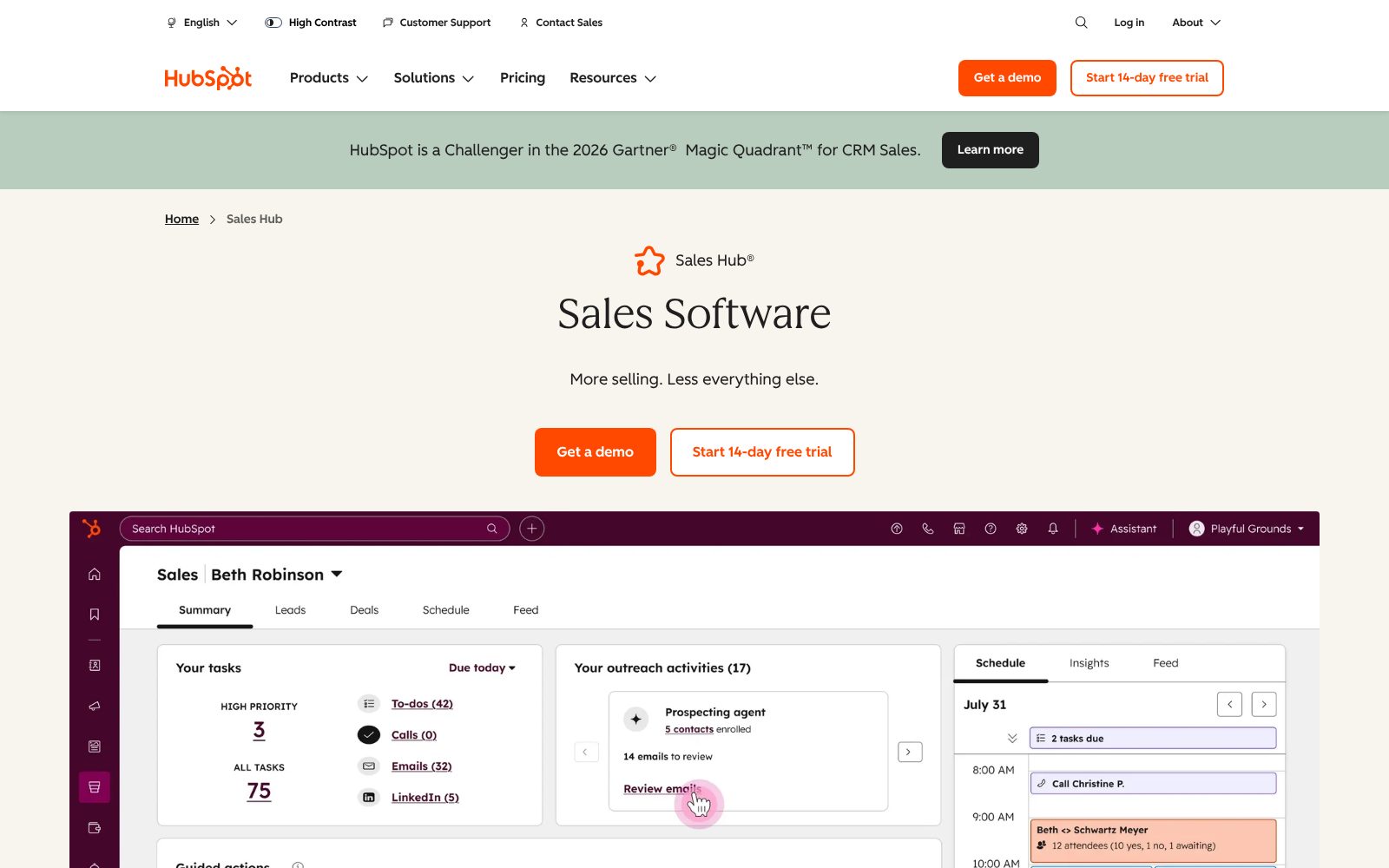
HubSpot Sales Hub pricing 2026
Free tools
Contacts, deals, email tracking and meeting links for up to 2 users.
- Contact and deal management
- Email tracking and templates
- Meeting scheduler
- Live chat
- HubSpot branding on tools
Starter
Removes branding, adds sequences, calling minutes and simple automation.
- Email sequences
- Calling (500 min)
- Quotes and e-signature
- Simple workflows
- Payments
Professional
Full sales automation, forecasting, playbooks and custom reports.
- Deal and lead scoring
- Sales workflows
- Forecasting
- Playbooks
- Custom reports
Enterprise
Custom objects, advanced permissions, conversation intelligence.
- Custom objects
- Conversation intelligence
- Predictive lead scoring
- Advanced permissions
- Sandboxes
What the sticker price leaves out. Starter is billed per seat; the free tier allows two users. Professional requires a one-time onboarding fee (currently $1,500) and a minimum seat count, and Enterprise onboarding is higher. Calling minutes, extra sequences and additional contacts for marketing are metered. Annual commitment is required for the published prices.
Starting price is about average for CRM tools we list (median $15/user/mo). Prices checked October 31, 2026; confirm on the vendor's pricing page before buying.
CRM feature checklist 8 of 8
The features buyers in this category ask for most, and whether HubSpot Sales Hub includes them on a plan you can actually buy. Percentages show how many crm buyers call each one essential.
Integrations, deployment and support
Integrations
Deployment
- Cloud / SaaS
- iOS app
- Android app
- Gmail and Outlook extensions
Support
- Email and chat (Starter+)
- Phone (Professional+)
- Knowledge base
- Community forum
- Customer success manager (Enterprise)
Training
- HubSpot Academy (free certifications)
- Documentation
- Webinars
- Paid onboarding (required for Professional+)
Platforms
- Web
- iOS
- Android
HubSpot Sales Hub pros and cons
Pros
- Free CRM tier with no time limit
- Deep native integration with HubSpot marketing and service tools
- Clean interface that new reps pick up quickly
Cons
- Professional and Enterprise tiers are a large price jump
- Many useful features sit behind the higher tiers
- Annual commitment required above Starter
HubSpot Sales Hub user reviews
No published reviews yet. Be the first.
HubSpot Sales Hub alternatives and comparisons
Best for small sales teams that live in the pipeline
$14/user/mo · 14-day trial
HubSpot Sales Hub FAQ
Is HubSpot Sales Hub really free?
Yes, the free CRM tools are free for up to two users with no time limit. They include contacts, deals, email tracking, meeting links and live chat, but with HubSpot branding and lower limits. Paid tiers start at $15 per seat per month.
What does HubSpot's onboarding fee cover?
Professional and Enterprise purchases require paid onboarding (from $1,500 for Sales Hub Professional). It covers setup consulting with a HubSpot specialist over the first 90 days. You can use a HubSpot partner agency instead.
HubSpot or Pipedrive for a small sales team?
Pipedrive is cheaper per seat and more focused on pipeline work. HubSpot is the better pick if you want marketing, support and a website on the same platform, or if ease of use matters more than price.
Does HubSpot integrate with QuickBooks?
Yes. The native QuickBooks Online integration syncs invoices and contacts, and Xero, Stripe and Shopify integrations are also native.
How much does HubSpot Sales Hub cost?
HubSpot Sales Hub has a free plan and paid plans start at $15/user/mo. Plans: Free tools (Free), Starter ($15, /seat/mo, billed annually), Professional ($100, /seat/mo, billed annually), Enterprise ($150, /seat/mo, billed annually).
What are the best alternatives to HubSpot Sales Hub?
In CRM, the closest alternatives we rate are Pipedrive (85/100). See the full list of HubSpot Sales Hub alternatives for a side-by-side comparison.
How we reviewed HubSpot Sales Hub
We score every product on four weighted criteria: ease of use (25%), features (30%), value (25%) and support (20%), from hands-on testing of the plans buyers can actually purchase, the vendor's published pricing and documentation, and verified user reviews. Vendors cannot pay for a higher score or a better rank; paid placements are labelled. This review was last updated on October 31, 2026. Read the full methodology.